
Wallets
Add funds once, then fund as many issues as you like without paying each one separately.
A wallet is a prepaid balance for bounties. It suits companies and maintainers who fund issues regularly: you pay one invoice, then fund each issue from the balance in a click.
Create a wallet and add funds
- Go to Payments → Wallets.
- Select Create wallet and give it a name.
- Select Add funds and enter the amount.
- Gitpay emails you an invoice, due in 30 days. Pay it by bank transfer or card.
When the invoice is paid, the amount is added to your wallet balance. Adding funds has no fee.
Fund an issue from your wallet
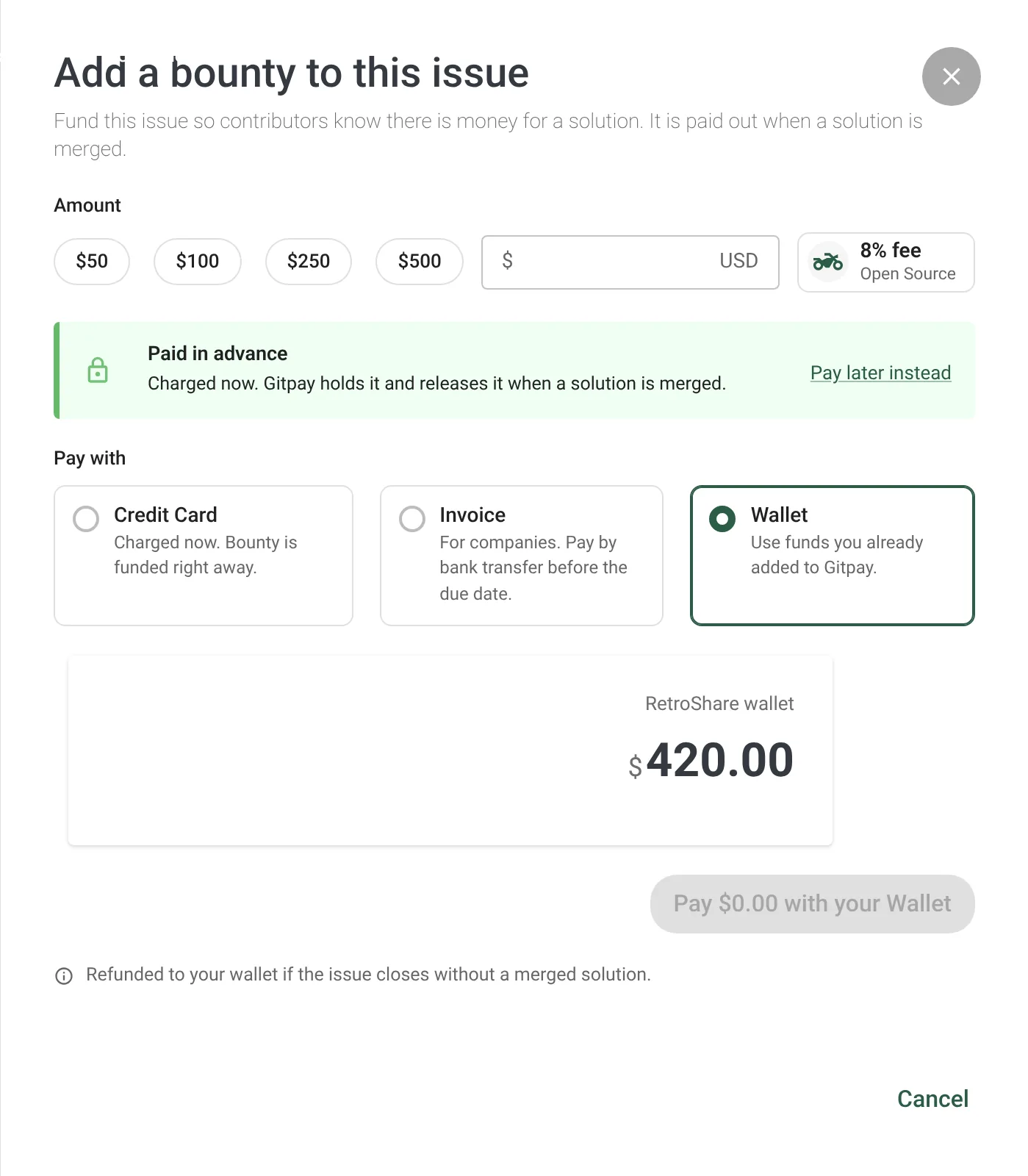
- On the issue, select Add bounty.
- Choose Paid in advance and Wallet.
- Check the total, which includes the plan’s fee, and select Pay with your wallet.
The bounty is funded immediately. If your balance doesn’t cover the total, Gitpay tells you, and you can add funds or choose another method.
Refunds
If a bounty you paid from a wallet is refunded, for example because nobody claimed it, the money goes back to your wallet, not to your card or bank.
See your balance
Your wallet balance is on your dashboard and in Payments → Wallets, with every top-up invoice and its status.